If you change the status or details of your property website and this is NOT being shown correctly when you share to Facebook, this is because Facebook holds a cache version of your website.
The best way to resolve this issue is to force Facebook to clear its cache by using their debug tool at this URL
https://developers.facebook.om/tools/debug
Click this link and enter the web address of your property website.
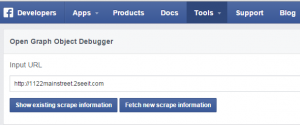 THEN… make sure you choose the option to “fetch new scrape”.
This will typically clear the problem immediately.